
Is This the Best 34-inch OLED Gaming Monitor?
Overall Rating: ⭐ 9.4/10
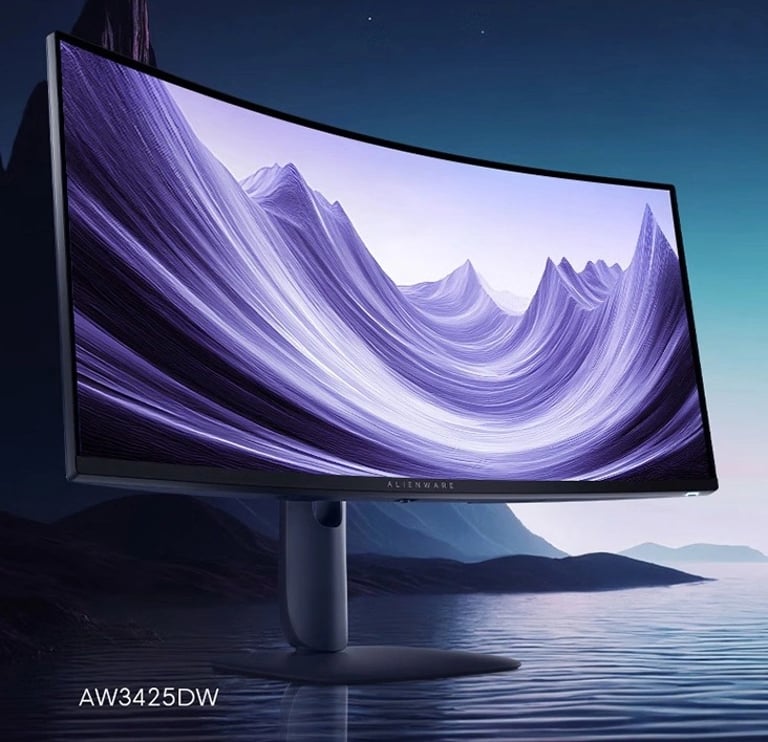
The Dell Alienware AW3425DW is one of the strongest contenders in the premium ultrawide gaming monitor market. Building on the success of the legendary AW3423DW, Dell has refined nearly every aspect of the experience. The result is a 34-inch QD-OLED display with a blazing-fast 240Hz refresh rate, exceptional HDR performance, deep blacks, and excellent factory calibration.
Whether you're a competitive gamer, a content creator, or someone looking for an immersive ultrawide experience, the AW3425DW delivers premium performance across nearly every category. While it isn't perfect—lacking USB-C video input and a built-in KVM switch—it excels where it matters most: image quality and gaming.

Design & Build Quality
Dell continues its premium Alienware design language with a modern and understated aesthetic. Unlike many gaming monitors covered in aggressive RGB accents, the AW3425DW balances gaming flair with a clean appearance that fits comfortably into both gaming setups and professional workspaces.
The stand feels exceptionally sturdy and provides excellent ergonomic adjustments, including:
Height adjustment
Tilt
Swivel
Cable management is integrated into the stand, helping keep desks tidy.
Although the monitor is built primarily from plastic, it feels premium thanks to tight panel tolerances and excellent assembly quality.
Build Quality Score: 9.5/10
Display Quality
This is where the AW3425DW truly shines.
Dell uses Samsung's second-generation QD-OLED panel, which combines OLED's perfect blacks with Quantum Dot technology for brighter colors and higher color volume.
Colors
The monitor produces extremely vibrant colors without appearing oversaturated.
Content creators will appreciate the excellent factory calibration, while gamers benefit from vivid environments that feel natural rather than exaggerated.
Contrast
Because every pixel is individually illuminated, contrast is effectively infinite.
Dark scenes in games like Cyberpunk 2077, Alan Wake 2, or Dead Space look phenomenal, revealing shadow details that IPS panels simply cannot reproduce.
Brightness
Although OLED brightness limitations still exist for full-screen white content, HDR highlights are impressive.
Explosions, sunlight reflections, and bright particle effects have exceptional punch.
Text Clarity
Dell has improved text rendering compared to the first-generation QD-OLED models.
While very sensitive users may still notice slight color fringing on small fonts, it is significantly less distracting than previous OLED generations.
Display Quality Score: 9.8/10
Gaming Performance
Gaming is the primary reason to buy this monitor.
The jump from 165Hz or even 175Hz to 240Hz is immediately noticeable in competitive games.
Movement feels incredibly smooth while input latency remains exceptionally low.
Games like:
Counter-Strike 2
Valorant
Apex Legends
Call of Duty
Fortnite
all benefit from outstanding motion clarity.
Unlike LCD monitors, OLED pixels transition almost instantly, eliminating traditional ghosting.
Motion remains sharp even during rapid camera movement.
If you've never experienced OLED gaming before, it's difficult to return to an LCD afterward.
Gaming Score: 10/10
HDR Performance
HDR is among the strongest features of the AW3425DW.
Thanks to OLED's pixel-level lighting, bright highlights coexist with perfectly black backgrounds.
Instead of blooming around bright objects—as commonly seen on IPS displays—the AW3425DW produces precise light control.
HDR-supported games become dramatically more immersive.
Examples include:
Cyberpunk 2077
Horizon Forbidden West
Starfield
Diablo IV
Movies also benefit greatly from OLED contrast.
HDR Score: 9.7/10
Productivity
Although marketed primarily as a gaming monitor, the AW3425DW also performs well for productivity.
The 3440×1440 resolution provides ample room for:
Side-by-side documents
Excel spreadsheets
Video editing timelines
Programming
Photo editing
The 21:9 aspect ratio significantly reduces the need for multiple monitors.
However, users who spend 8–10 hours daily working with static applications should keep OLED burn-in considerations in mind.
Dell includes multiple OLED protection features:
Pixel Refresh
Panel Refresh
Pixel Shift
Logo detection
These work automatically and reduce long-term burn-in risk.
Productivity Score: 8.9/10
Connectivity
The monitor includes:
✔ 2× HDMI 2.1
✔ DisplayPort 1.4
✔ USB Hub
However, some competitors now offer:
USB-C
KVM Switch
Power Delivery
Their absence is the monitor's largest weakness.
Connectivity Score: 8.5/10
Verdict:
Buy if:
You want one of the best OLED gaming monitors available.
HDR performance matters to you.
You play fast-paced competitive games.
You enjoy immersive single-player titles.
Skip if:
You need USB-C with Power Delivery.
You frequently connect multiple computers.
You mainly work with static office applications all day.
Final Verdict
The Dell Alienware AW3425DW represents a meaningful evolution of an already outstanding monitor series. Rather than chasing gimmicks, Dell focused on refining the fundamentals: motion clarity, image quality, HDR performance, and overall gaming responsiveness. The result is a display that feels exceptionally polished and consistently delivers across a wide range of use cases.
Its second-generation QD-OLED panel offers stunning contrast, rich color reproduction, and near-instantaneous pixel response times, making fast-paced games feel remarkably smooth while also bringing cinematic titles to life. Factory calibration is excellent, ergonomics are solid, and the 3-year OLED warranty provides additional peace of mind.
The monitor isn't without compromises. Users who rely on USB-C connectivity, integrated KVM functionality, or all-day office workloads may find better options elsewhere. Nevertheless, these omissions do little to diminish its strengths as a premium gaming display.
If your primary goal is to experience the best combination of ultrawide immersion, OLED image quality, and high-refresh-rate gaming, the Alienware AW3425DW deserves a place at the top of your shortlist.
Overall Scores
Category Score:
Gaming 10.0 / 10 Image Quality 9.8 / 10 HDR 9.7 / 10 Build Quality 9.5 / 10 Productivity 8.9 / 10 Connectivity 8.5 / 10 Value 9.4 / 10
Overall Rating: 9.4 / 10
Who Should Buy It?
The AW3425DW is ideal for:
Competitive gamers
RPG fans
Sim racers
Flight simulator enthusiasts
Content creators
PC enthusiasts seeking one of the best ultrawide OLED experiences available
It is less suitable for users who primarily need extensive productivity features like USB-C docking or integrated KVM functionality.
✅ Pros
Outstanding QD-OLED image quality
Perfect blacks
Incredible HDR
240Hz refresh rate
Excellent motion clarity
Very low input lag
Premium design
Excellent factory calibration
HDMI 2.1 support
3-year OLED warranty
❌ Cons
No USB-C
No KVM switch
OLED burn-in remains a long-term consideration
Premium price
Brightness lower than high-end Mini-LED in full-screen white scenes
Specifications
Dell Alienware AW3425DW Review (2026)
Dell Alienware AW3425DW review: 34-inch QD-OLED ultrawide monitor with 240Hz, HDR True Black 400, and top-tier gaming performance.
REVIEWS
Contact
Questions? Reach out anytime here.
info@ultrawidehub.com
© 2026. All rights reserved.